Put the product in the customer's hands.
Rotate, zoom and pan a 3D view to see the product from useful angles.
 Start a project
Product Story Studio · by CUPS Innovation
Turn a 3D product model into an interactive marketing presentation. Let customers explore its parts, discover features and follow a guided tour—at their own pace.
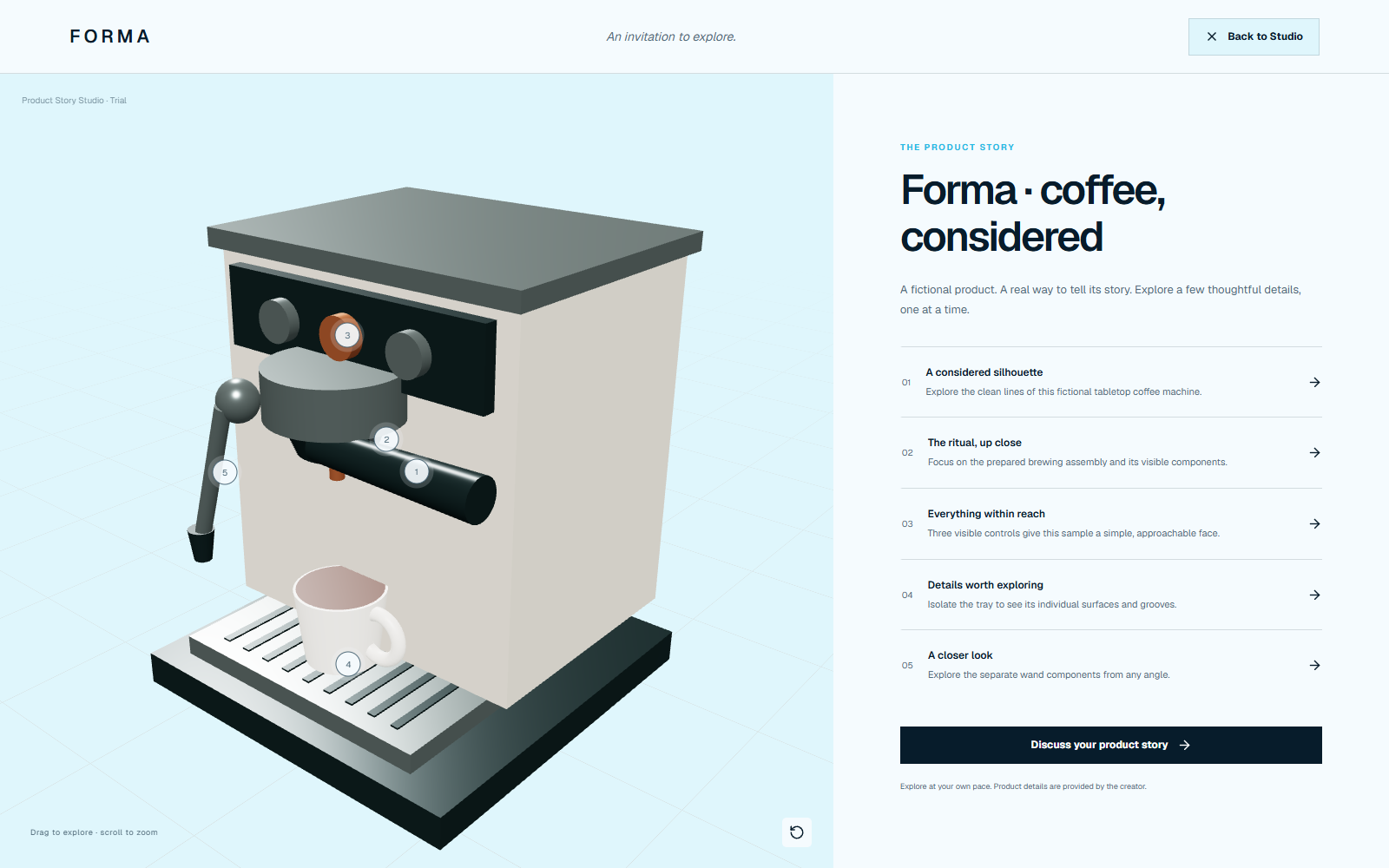
Make the product easier to understand
A picture shows the outside. Product Story Studio lets your audience look around, select a component and understand why it matters. You choose the features, write the story and decide what is included in the buyer presentation.
Rotate, zoom and pan a 3D view to see the product from useful angles.
Give components clear names, feature titles and explanations linked to selectable hotspots.
Save camera views and build a self-paced tour that introduces the product one detail at a time.
Preview what buyers will see, then export a reviewed interactive package or a product image.
Inside the Studio
The product explorer sits beside your model. Story, brand, tour and gallery controls let you shape the presentation without writing code.
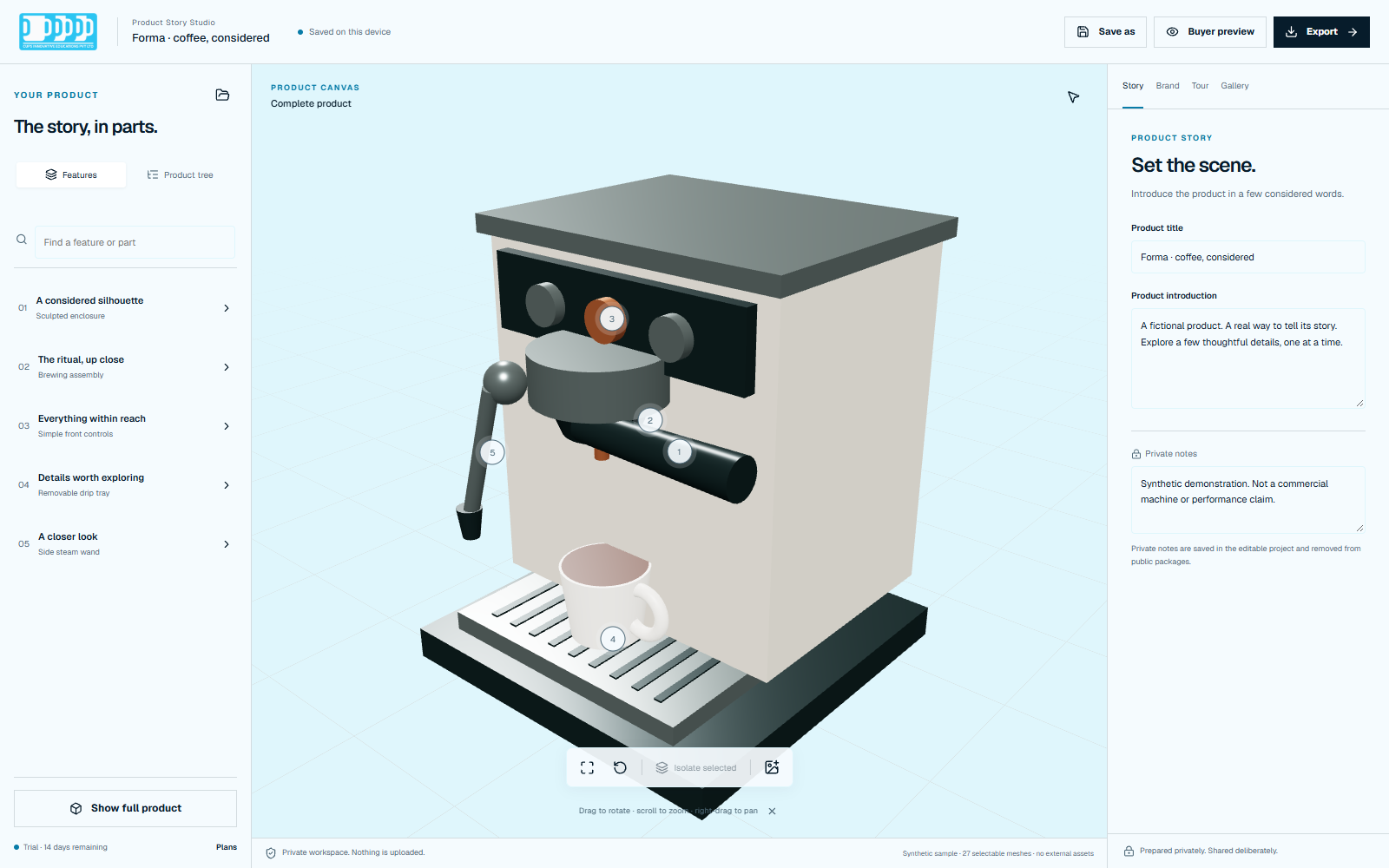
Who it is for
Use a product story in a sales conversation, a dealer demonstration or an online presentation. The same authoring tools support different audiences.
Manufacturers & brands
Show approved components and explain the purpose of each feature. Help buyers understand details that are difficult to communicate in a single image.
Distributors & sales teams
Prepare a repeatable feature walkthrough, then explore individual parts when questions arise. Add a contact or enquiry action for the next conversation.
Online sellers & agencies
Create a product explanation for independent exploration. Use approved photographs for an image-based story when a suitable 3D model is unavailable.
Available now
These features are working in the current development preview. The bundled sample is a safe way to try them before preparing your own model.
Drag to rotate, scroll to zoom and right-drag to pan. Fit the product back into view whenever you need a fresh starting point.
Browse or search the feature list and product tree. Select a component to connect what you see to the story written about it.
Focus on a selected component without surrounding geometry getting in the way, then return to the full product. Selectable parts depend on how the model is structured.
Attach a benefit title and description to a part. Show selectable labels on the model and adjust their anchor position when labels overlap.
Position the camera, add the current view and write a step title and description. Order the steps for a self-paced presentation with next/back controls.
Set a brand name, accent colour and call-to-action label. Link to an HTTPS page, email address or telephone number so buyers have a clear next step.
Check the audience view before sharing. Review which parts are approved, preview the exact export package and keep private notes out of public exports.
Add PNG, JPEG or WebP images to a gallery or image story. Save an editable project locally and reopen it to continue work later.
How to use it
Start with the sample to learn the controls. Activate the local trial when you are ready to author. No coding is required; preparing and optimising a suitable 3D asset may need help from your modelling team.
Choose “Explore sample” on this page. Rotate the fictional coffee machine, select a feature and use Buyer preview to see the presentation your audience would receive.
Activate the free local development trial, open a starter and choose the “Open local GLB” folder control above the product explorer. Use a self-contained GLB below 50 MiB. To continue existing work, use “Open a project” on the Studio start screen instead.
Set the product introduction, then select a part and add its public name, benefit title and feature description in the Story tab. Use approved product claims and choose which parts are approved for sharing.
In Tour, position the camera and choose “Add current view” for each step. In Brand, set the display name, accent colour and sales link. In Gallery, add approved photographs if you need an image story.
Use “Buyer preview” to check the experience. Choose “Save as” to download the editable project, including its source content and private notes. Keep that file as your working backup.
Open Export, review the included parts and files, and preview the exact package before downloading the interactive ZIP. You or your web team can serve the extracted package on a static website. Built-in publishing is planned; there is no one-click hosted publishing in this release.
The audience experience
The buyer view removes authoring controls and presents the product, feature explanations and guided tour. Visitors can explore independently and follow the sales action you set.
What you can take away
Keep the editable original for your team. Share a reviewed marketing output with your audience.
Continue creating
Download a local project file to reopen in the Studio. It includes the model, story, settings and private notes. Treat it as a private working file, not a buyer handout.
Interactive presentation
Export a standalone buyer experience with the approved content and local viewer assets. Extract and serve it through a static web server; simply double-clicking the HTML file may not work. Trial exports carry a visible watermark.
Visual communication
Capture the current canvas as a PNG at its current resolution, or export a story using your approved images. PNG output has an opaque background and a trial watermark. Video export is not available.
The website delivers the Studio application to your browser. Model inspection, rendering, story editing and export generation then happen on your device. Opening a model or project does not upload its contents to a Studio project server. Browser recovery and the local trial record are stored in this browser profile; download an editable project for a separate backup.
Loading the site requests the page, application files, fonts and sample assets from the web host. The host can receive ordinary request information such as your IP address. Clicking an external sales link contacts its destination. Exporting downloads files locally; it does not publish or upload them. The current application has no project-upload or hosted-publishing service.
Your editable project can contain the full model and private notes. The reviewed public package excludes private notes and unapproved parts according to the approval hierarchy. Inspect its preview and file list before sharing. Any files you later upload to your own host are available under that host's access rules.
Browser-delivered geometry can be downloaded or copied. Approval controls help you choose what to include; they do not make shared geometry impossible to extract. Use a marketing-safe model with confidential details removed before export. Deleting a hosted page cannot recall copies already downloaded.
Trial & availability
This is an early development preview, with working local authoring and export. Paid access and built-in hosting are not live.
Explore now
Open the sample without an account, payment card or trial activation. Inspect the model and preview the buyer experience before deciding to create your own story.
Explore sample →Available now
Activate it explicitly in the Studio to author and export. The trial record is local to this browser. PNG and interactive exports are watermarked. There is no payment, checkout or automatic renewal.
Open Studio to activate trial →After the trial
Creation and new marketing exports are locked. Inspection, buyer preview, reopening projects and private recovery downloads remain available. Existing exported files are not remotely disabled.
Read the common questions ↓Commercial authoring with unwatermarked exports is intended for a future paid Studio plan. Team access, hosted experiences and engagement reporting are planned capabilities. Paid licences and checkout are not implemented, plans cannot currently be purchased, and no public price is set. There is no payment route to unlock these features today.
A Windows portable build exists for development testing, but no signed public installer or verified public download is offered here. Use the browser preview to get started.
Use the bundled Forma sample to learn. For your own 3D product, provide a self-contained GLB below 50 MiB with useful separate parts. A single merged mesh cannot automatically become an assembly of independently selectable components. An image-story starter is available when you only have product photographs.
No. CAD conversion, automatic cutting and model simplification are not available. Export a suitable GLB from your modelling workflow first. Import checks also limit geometry and textures; complex production assemblies may need preparation and testing.
Not yet. Download the reviewed interactive ZIP, extract it and ask your web team to serve the contents on a static host. You control that hosting and access. Built-in publication management, accounts and analytics are planned.
The current branding controls support a name, accent colour and sales action. Custom logo upload and encoded video export are not implemented. Available outputs are the editable project, interactive ZIP, PNG capture and image-story package.
The buyer presentation has responsive controls for desktop and mobile browsers. A modern browser with WebGL is needed for 3D. Authoring is best on a desktop with a mouse; test your own model on the devices your audience uses. No universal model-performance guarantee is made.
No. Browser recovery is local and can disappear if browser data is cleared or you change profile or device. Use “Save as” and keep your downloaded editable project somewhere safe. Public export files are different from editable backups.